Food photography with a smartphone: a practical guide
How to shoot dishes that make people hungry using only your phone: light, angles, styling and quick edits for cafés and restaurants.
Your food may taste wonderful, but online people only see the photo. A dark, blurry picture of khachapuri taken under a yellow ceiling lamp does not make anyone hungry, and it quietly tells guests that the place is careless.
The good news is that a modern smartphone is more than enough. What makes the difference is light, angle and a few minutes of preparation. Here is a routine you can repeat every time a new dish comes out of the kitchen.
Start with light, not with the phone
Light matters more than any camera setting. The best place in most cafés is a table next to a large window during the day.
- Use side light. Place the plate so the window is to the left or right of it. Side light shows texture: the crust of bread, the shine of sauce, the steam from soup.
- Avoid direct midday sun. Harsh sun creates hard shadows and burnt highlights. If the sun hits the table, hang a white curtain or a sheet of baking paper over the window.
- Turn off overhead lamps. Mixing warm indoor light with daylight gives strange yellow and blue patches that are hard to fix later.
- Never use the flash. It flattens food and makes it look greasy.
If a shadow side looks too dark, hold a white napkin, a menu card or a piece of white foam board opposite the window. It bounces light back and softens the shadows for free.
Pick the right angle for each dish
Different dishes have a best side. Try these three angles and keep the one that works:
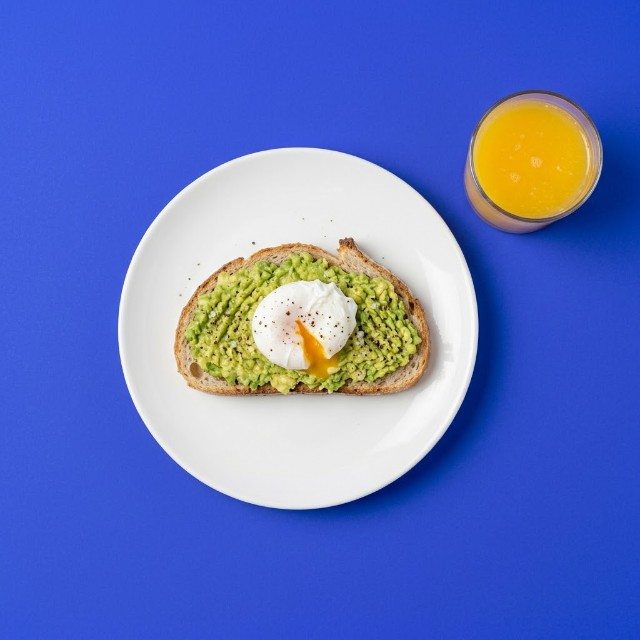
- Top-down (90 degrees): for flat dishes and tables full of food. Pizza, salads, a spread of pkhali, a supra table seen from above.
- Three-quarter (about 45 degrees): the view a guest has when sitting at the table. Good for most plated dishes, pasta, stews and desserts.
- Eye level (0 degrees): for tall things. Burgers, layered cakes, drinks in a glass, a stack of pancakes.
Keep the phone straight. Turn on the grid in your camera settings and line up the edge of the table or plate with it. Wiped lens, by the way, is the cheapest upgrade there is: phones live in pockets and greasy kitchens.
Style the plate in five minutes
You do not need a food stylist. You need a clean plate and a little thought.
- Wipe drips and fingerprints from the rim of the plate.
- Shoot quickly. Melted cheese, fresh herbs and foam on coffee look best in the first minute or two.
- Add one or two props that tell a story: a fork, a linen napkin, a glass of wine, a small bowl of the main ingredient.
- Leave some empty space around the plate so the photo can be cropped for different formats later.
- Add a human touch sometimes: a hand breaking bread or pouring sauce makes the photo feel alive.
Keep backgrounds simple. A wooden table, a plain tablecloth or a stone surface works better than a busy pattern. If your café has a signature table or wall, use it again and again so customers recognise your photos.
Camera settings worth knowing
Leave most things on automatic, but learn two tricks:
- Tap to focus on the most important part of the dish, for example the yolk on adjaruli khachapuri.
- Slide exposure down slightly after tapping if bright parts look washed out. Slightly darker food photos usually look richer.
Portrait mode can blur the background nicely for drinks and tall dishes, but check the edges: it sometimes cuts off parts of a glass or a plate. Avoid digital zoom; step closer instead, or use the phone's dedicated telephoto lens if it has one.
Edit lightly and consistently
A good food photo needs only a few adjustments in the phone's built-in editor:
- Straighten and crop.
- Raise brightness a little if needed.
- Correct warmth so white plates look white, not yellow or blue.
- Add a touch of contrast. Be careful with saturation: too much makes food look artificial.
Use the same small set of edits for every photo so your feed looks like one restaurant, not ten different ones. For dishes you sell for delivery or takeaway, you can also try the free AI photo tool, which turns a simple phone shot into a clean studio-style image.
Build a photo habit
The hardest part is not shooting one good photo, it is having fresh photos every week. A simple routine helps:
- Choose one fixed spot by the window as your photo corner.
- Shoot every new or seasonal dish before service starts, for example at 11:00 when light is good and the kitchen is calm.
- Take 10-15 shots per dish from different angles. One of them will be great.
- Save the best ones in a separate album so they are ready for posts.
If you need ideas for what to do with those photos, see our list of post ideas for cafés.
Start this week
Pick your three best-selling dishes. Shoot each one by the window, from all three angles, with the overhead lights off. Edit them the same way and compare them with the photos currently on your page. Most owners are surprised how much better the food looks with nothing more than daylight and a clean plate. Repeat it every time the menu changes, and your page will slowly become the reason people visit.